


zainularfeen
Level 1
Write the reason you're deleting this FAQ

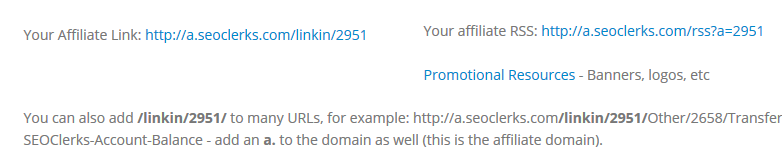

 This discussion is closed, however I want to offer more understanding about the affiliate ID, or USER ID and how to find it for others that still have trouble or how to find someone else's USER ID..
On the Affiliate page, if you scroll down you'll see a section that looks like this:
[url=https://www.seoclerks.com/files/user/images/r2k29jf.png][url=https://www.seoclerks.com/files/user/images/r2k29jf.png][img]https://www.seoclerks.com/files/user/images/r2k29jf.png[/img][/url][/url]
The blue links have your USER ID applied to them, for instance:
http//a.seoclerks.com/linkin/2951 (2951 would be my USER ID)
Another way to get your USER ID from the same page, is to use the RSS feed link:
http://a.seoclerks.com/rss?a=2951 (2951, again would be my USER ID)
Basically, the number within those URLs will be your USER ID.
/linkin/#####
a=#####
##### meaning your USER ID.
[b]How to find someone else's USER ID:[/b]
To find someone else's USER ID is quite trickly, but easy once you know how. Go to the user's profile, and right click on their profile pic, and choose "View image", or "View image location".
Once you right click on the profile pic, and select either "view image", or "view image location" you'll be taken to a page will it will just show the image.
In the URL you'll see this:
[url=https://www.seoclerks.com/files/user/images/ti2it2.png][url=https://www.seoclerks.com/files/user/images/ti2it2.png][img]https://www.seoclerks.com/files/user/images/ti2it2.png[/img][/url][/url]
The red box contains numbers. Generally, with this URL, any number that comes before the image filetype, and period ( . ) is that user's USER ID.
Since the image URL has 2951, that would be my USER ID.
Hope these tricks, and tips help. :)
This discussion is closed, however I want to offer more understanding about the affiliate ID, or USER ID and how to find it for others that still have trouble or how to find someone else's USER ID..
On the Affiliate page, if you scroll down you'll see a section that looks like this:
[url=https://www.seoclerks.com/files/user/images/r2k29jf.png][url=https://www.seoclerks.com/files/user/images/r2k29jf.png][img]https://www.seoclerks.com/files/user/images/r2k29jf.png[/img][/url][/url]
The blue links have your USER ID applied to them, for instance:
http//a.seoclerks.com/linkin/2951 (2951 would be my USER ID)
Another way to get your USER ID from the same page, is to use the RSS feed link:
http://a.seoclerks.com/rss?a=2951 (2951, again would be my USER ID)
Basically, the number within those URLs will be your USER ID.
/linkin/#####
a=#####
##### meaning your USER ID.
[b]How to find someone else's USER ID:[/b]
To find someone else's USER ID is quite trickly, but easy once you know how. Go to the user's profile, and right click on their profile pic, and choose "View image", or "View image location".
Once you right click on the profile pic, and select either "view image", or "view image location" you'll be taken to a page will it will just show the image.
In the URL you'll see this:
[url=https://www.seoclerks.com/files/user/images/ti2it2.png][url=https://www.seoclerks.com/files/user/images/ti2it2.png][img]https://www.seoclerks.com/files/user/images/ti2it2.png[/img][/url][/url]
The red box contains numbers. Generally, with this URL, any number that comes before the image filetype, and period ( . ) is that user's USER ID.
Since the image URL has 2951, that would be my USER ID.
Hope these tricks, and tips help. :)
Are you sure you want to delete this post?
anwebservices
Use only number which you find on that page. Hope it helped you. If you have any more difficulties, don't hesitate to ask here in community discussion.
Also other questions regarding any other topic related to Seoclerks is welcome so you can work without doubts
Good luck Hello. Your seller ID is actually same as affiliate ID and you can find it on this link: [url]https://www.seoclerks.com/balance/affiliate[/url] Use only number which you find on that page. Hope it helped you. If you have any more difficulties, don't hesitate to ask here in community discussion. Also other questions regarding any other topic related to Seoclerks is welcome so you can work without doubts :) Good luck
Are you sure you want to delete this post?